Peeking into /proc: turning live Linux data into evidence
After a long stretch of management talk and incident playbooks, it feels good to get my hands dirty again.
This round is about Linux internals, and more precisely the /proc virtual filesystem, because a well-run forensic workflow can turn that volatile, live process data into structured evidence you can actually review.
/proc as a live kernel interface
If you want the authoritative semantics of each file, keep the kernel documentation open while you read this.
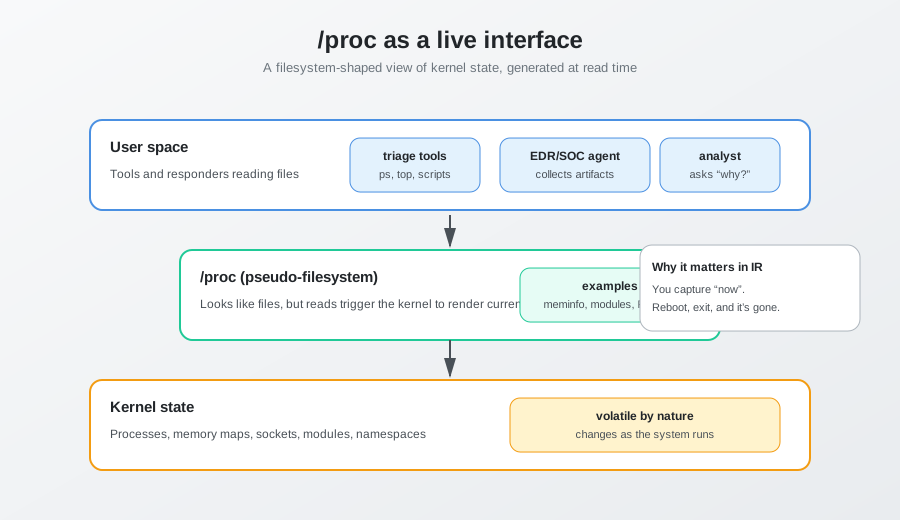
The first thing to remember is that /proc is not a regular folder, it is a pseudo-filesystem where the kernel exposes its state through a filesystem-like interface. When a tool reads /proc/meminfo or /proc/cpuinfo, it asks the kernel to generate current state on the spot, which is why it can feel “weird” the first time you treat it like a normal directory. If you want a friendly, hands-on explanation, Fernandovillalba’s walkthrough is a great companion.
This design is practical: user space gets a consistent way to query kernel and process data without a custom API for every little thing. It is also why /proc shines during incident response, because it is tied to what is running right now.
A few global paths under /proc routinely show up in forensic triage:
/proc/meminfo, the detailed memory stats (free, cached, buffers, swap, and a lot more)./proc/modules, the live list of loaded modules, handy when you want to spot unexpected drivers or rootkit tricks; the Velociraptor artifact notes cover it if you use Velociraptor in your fleet./proc/net/*, a cluster of files that describe sockets, protocol tables, and active connections.
Even before diving into individual processes, these files sketch the baseline: is the system under pressure, which subsystems are active, and does anything look “off” compared to the usual profile.
If you are building a broader Linux IR checklist, the Magnet Forensics overview is a good reference point, and it pairs nicely with /proc because it reminds you what to grab when you have time.
Process directories, the core of /proc
The real treasure is under /proc/<PID>/, one directory per running process. Here /proc stops being a generic status board and turns into a way to reconstruct concrete behavior: which binary is running, with which arguments, in which environment, and with which resources open.
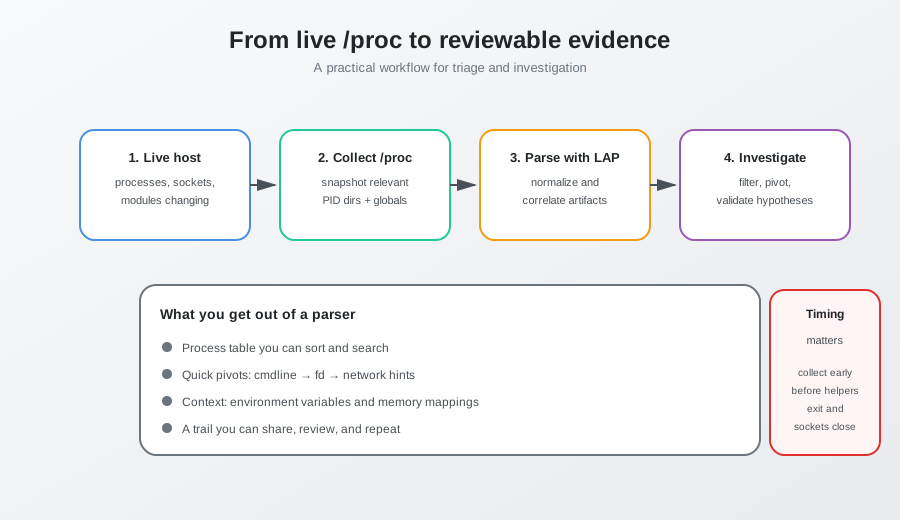
Where it really helps, at least in my experience, is the boring part of incident work: reducing the time you spend navigating and the number of times you have to repeat the same checks.
For example, instead of jumping between /proc/<PID>/cmdline, /proc/<PID>/fd/, /proc/<PID>/environ, and /proc/net/* for a dozen different processes, you can start from a process table and work your way down. That changes the flow of the analysis.
Typical things I look for when I have a /proc dataset loaded into a tool like LAP:
- Processes with odd provenance (unexpected path, deleted executable, strange parent/child relationships).
- Command lines that explain behavior (inline scripts, suspicious flags, LOLBAS-style abuse on Linux).
- Environment variables that should not exist in production (proxy overrides,
LD_PRELOAD, credentials in cleartext). - Open file descriptors that connect the dots (an outbound socket plus access to sensitive files, or a process that keeps a log file open while it is being truncated).
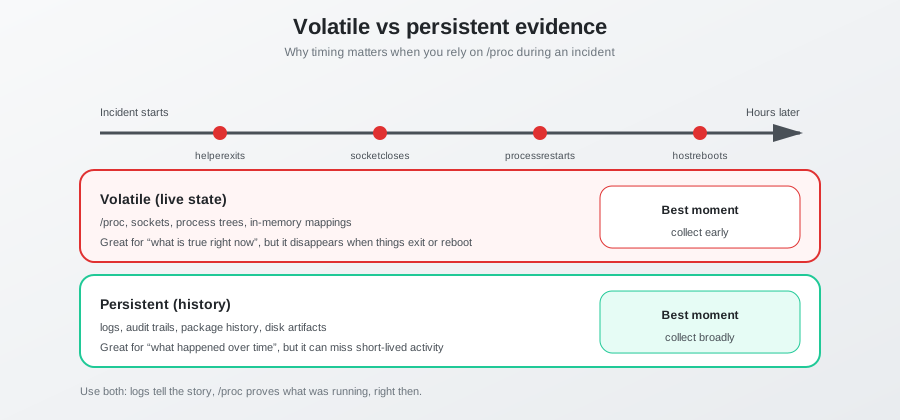
One practical tip: if you plan to use LAP (or any other parser), treat collection as a first-class step. In a real incident, /proc changes while you are looking at it. A process can exit, a socket can close, a helper can run and disappear. If you capture too late, you end up doing analysis on a world that no longer exists.
In practical terms, a /proc-aware parser tends to produce a process table that includes, at minimum:
- PID and identity fields (executable path, command line).
- Memory summaries derived from per-process status and mapping data.
- Lists of open file descriptors with resolved paths and sockets that can be correlated with
/proc/net/*. - Environment variables, so analysts can read runtime configuration and spot suspicious overrides.
This structure makes the workflow feel like analysis rather than exploration. Instead of wondering “what next”, you filter for anomalies, pivot across artifacts, and validate hypotheses quickly.
Two details matter a lot for reliability.
First, completeness of collection. If acquisition misses per-process files like fd/, environ, or the metadata that identifies the executable and command line, the output will be partial and potentially misleading. Second, timing. /proc is a moving target, so collect early and deliberately, especially when malware might spawn short-lived helpers or flip network state quickly.
A useful mental model: /proc is the live, high-resolution layer. Logs and persistent artifacts give you the story over time; /proc shows what is true right now, and a good parser helps capture and correlate that truth before it evaporates.