When deleting Signal is not enough: the FBI, iPhone notifications, and what forensics can reveal
A few days ago, 404 Media published a detailed report that made a lot of people uncomfortable: the FBI managed to recover Signal messages from a suspect’s iPhone, even though the app had already been uninstalled. No encryption was broken. No Signal server was compromised. The messages were sitting in the phone’s own notification database, waiting to be found.
The case itself involves a relatively minor charge, vandalism in the United States, but the forensic technique that emerged from the related court proceedings is genuinely interesting and worth unpacking in some detail. This case is not about Signal’s cryptography. It is about iOS data persistence and the false assumption that uninstalling an app deletes all evidence.
What actually happened in court
According to the 404 Media reconstruction, an FBI agent testified during the trial that some incoming Signal messages had been recovered from the defendant’s iPhone through what was described as Apple’s internal notification storage. Signal was no longer installed on the device, but the text of previously received notifications was still present in the system’s notification database.
There is an important detail to keep in mind here: only incoming messages were recovered, not outgoing ones. This is entirely consistent with how push notifications work. When someone sends you a message on Signal, the app server pushes a notification to Apple’s infrastructure, which then delivers it to your device. If the notification content was not stripped before delivery, the text lands in the operating system’s notification database. Outgoing messages, which originate directly from your device to the server, never go through this pathway and therefore leave no equivalent trace.
The defendant apparently had Signal’s notification preview setting enabled, meaning the content of incoming messages was included in the notification payload and saved by iOS as part of its normal operation. That single configuration choice turned a security-conscious application into a source of recoverable evidence.
Inside Apple’s push notification system
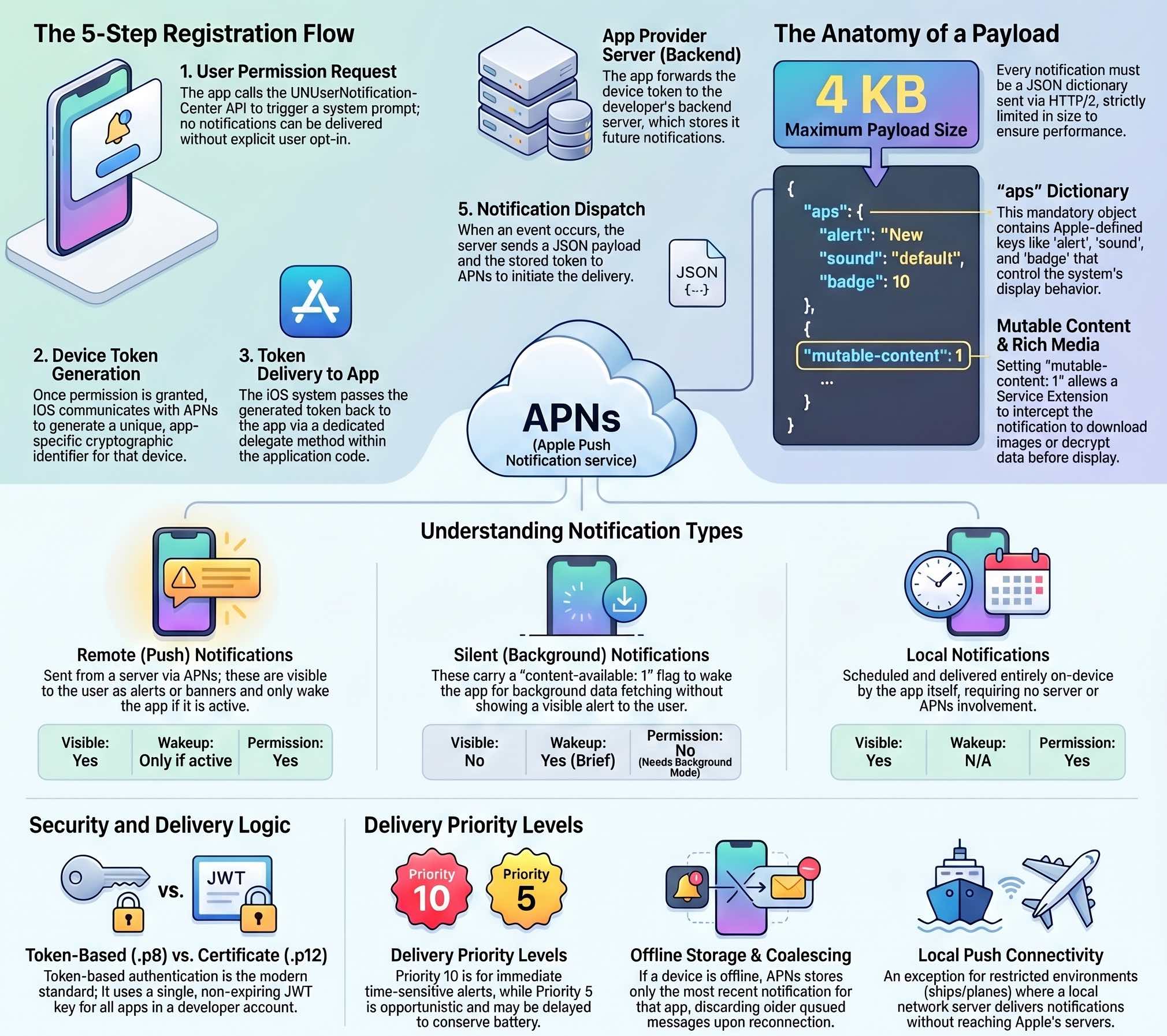
To understand why this data persists, first look at how Apple Push Notification service (APNs) operates. APNs is the central, cloud-based gateway through which all remote notifications must pass before reaching an Apple device. It acts as an intelligent broker: receiving notification requests from app provider servers, validating them, and routing them to the correct destination over a secure connection.
Before any notification can be delivered, an initial registration sequence must take place. When you first install a messaging app and allow notifications, iOS asks the user for permission. Once granted, the system communicates with APNs and receives a unique device token. The app then forwards this token to its backend server.
When someone sends you a message, the app’s server constructs a JSON payload (up to 4 KB) containing the notification instructions and sends it to APNs, which encrypted device token in hand, routes it to your specific device. The payload contains an aps dictionary where developers specify elements like the alert title and body, sound, badge counts, and specific flags.
A critical flag is mutable-content: 1. If present, it wakes the app via a Notification Service Extension before the alert is shown to the user. This is exactly what end-to-end encrypted messaging apps like Signal use: the incoming notification itself does not contain the readable message, but once the extension kicks in, it decrypts the payload and modifies the notification content locally before it hits the screen.
Forensic examiners focus on this detail: iOS does not discard notification data immediately after display. The system keeps a notification database on the device, and uninstalling an app does not automatically delete it. The push notification token associated with an app is also not immediately invalidated upon removal, so servers can technically continue sending notifications even after the app is gone, though the operating system will ultimately handle them without a corresponding app to receive them.
Apple recently updated its APNs token authentication system, as announced on the developer portal in early 2025, introducing team-scoped and topic-specific keys to improve security and traceability. Whether this change has any bearing on the notification persistence issue is unclear, but the timing is at minimum worth noting.
The notification database as a forensic artifact
The relevant database on iOS lives within the system’s BulletinBoard framework. Analysts familiar with full filesystem acquisitions will recognize the path /private/var/mobile/Library/BulletinBoard/, which contains structured data about notifications, including their content, timestamps, and associated bundle identifiers.
This is not new from a forensic standpoint. In my BFU acquisition post using checkra1n I documented /Library/BulletinBoard/ClearedSections.plist as a log of cleared notifications. The data was always there; this case simply brought it into public awareness.
This artifact matters because of its relationship to device security states. iOS operates with two primary encryption modes: BFU, or Before First Unlock, and AFU, After First Unlock. In BFU state, the device has been powered on but the passcode has not yet been entered, and most user data is protected under a more restrictive encryption class. In AFU state, following the first unlock, a broader set of data becomes accessible, and this is the state in which most forensic acquisitions yield useful results. The notification database, depending on the protection class assigned to it, may be accessible in AFU state even without a jailbreak, particularly through backup-based extraction methods.
It is useful to consider how iOS handles data caching and persistence more broadly. The system preserves data so it can redisplay notifications, reconstruct notification center state after a restart, and maintain continuity between sessions. That behavior is intentional, but it creates a forensic surface that is easy to miss.
How investigators likely extracted the data
The 404 Media report does not confirm the exact method used by the FBI, and no official statement has been made about the specific technique or the state of the device at the time of examination. However, based on what is publicly known about iOS forensic methods, a few scenarios are plausible.
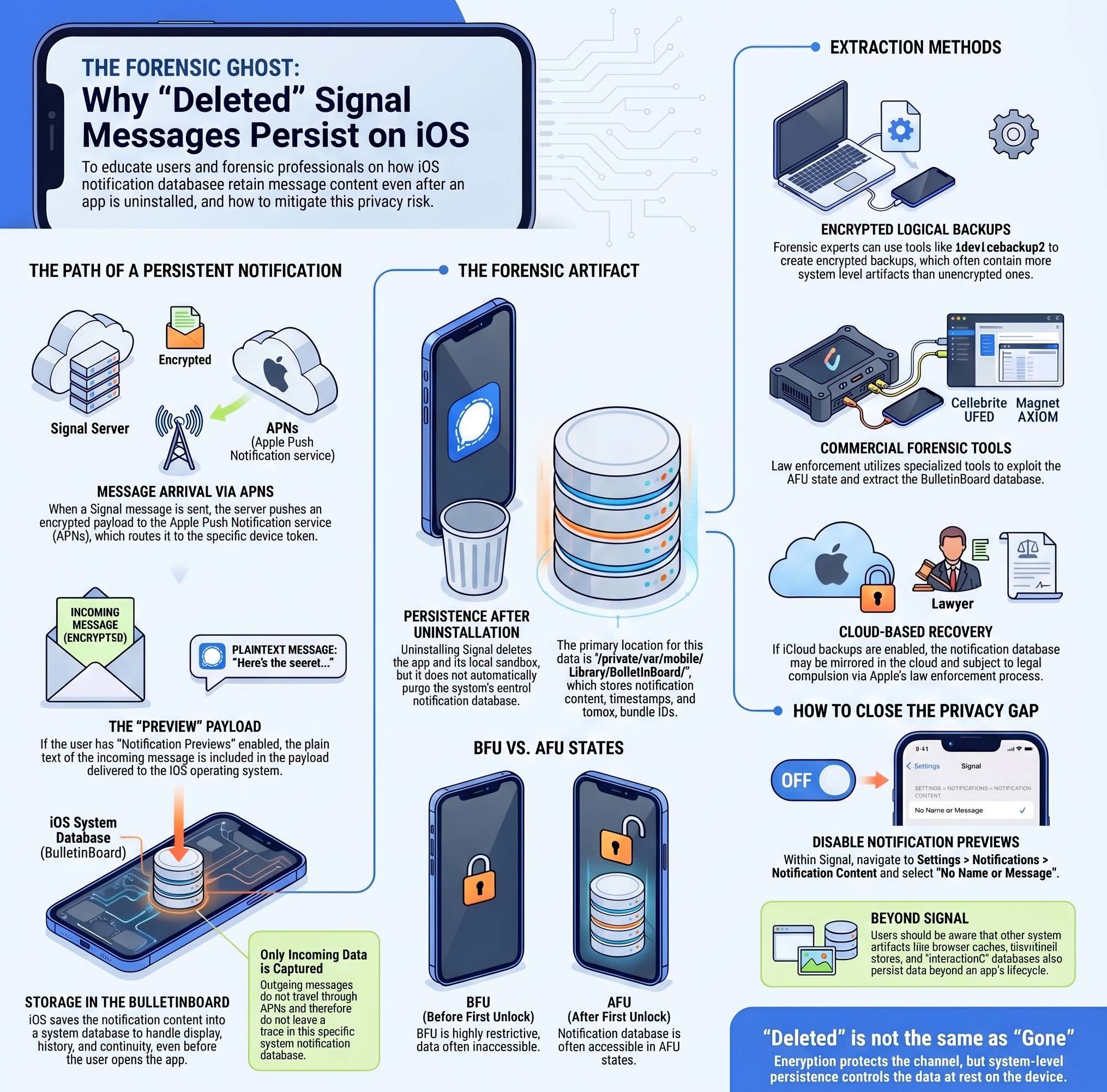
The most likely path, especially if the device had been unlocked at some point after seizure, is a logical acquisition combined with an analysis of the extracted backup. As I have covered in detail in my guide to iOS forensics without jailbreak, encrypted iTunes backups contain significantly more data than their unencrypted counterparts, and they can include system databases and app artifacts that reveal quite a lot about device state and user activity. Backup extraction using idevicebackup2 is forensically sound and requires no modification of the device itself.
If investigators had access to the device in AFU state, they may also have used commercial forensic tools like Cellebrite UFED or Magnet AXIOM, which are designed specifically to extract data from iOS devices using a combination of backup protocols, advanced logical acquisition via AFC, and in some cases, exploits targeting known vulnerabilities in the iOS kernel or bootchain. These tools are widely used by law enforcement and are capable of recovering artifacts that would not be accessible through standard backup methods.
A third possibility is that the data was extracted from a backup stored in iCloud, if the device had cloud backups enabled. iCloud backups, when legally compelled through Apple’s standard law enforcement process, include many of the same artifacts as a local encrypted backup, potentially including notification database contents.
For context, the logical acquisition workflow I documented using libimobiledevice gives a clear picture of what is accessible at this tier: native application data, system databases, connectivity artifacts, and behavioral pattern data, all without touching the jailbreak route. The notification database falls within the scope of what a well-executed logical acquisition can surface.
This case reminds us that data can be recoverable even when the user is not actively using or seeing it. Once information is written to persistent storage on an iOS device, access depends on encryption class, device state, and acquisition method. “Deleted” is not the same as “gone”, and that applies to notifications as well as many other iOS artifacts.
What this means for your privacy
The specific fix is simple: in Signal’s settings, under Notifications > Notification Content, select “No Name or Message”. That prevents iOS from storing readable message text in the notification database, leaving only metadata and, in some cases, sender identifiers. Mashable’s coverage of the story explains the setting in plain terms.
The broader implication is harder to address with a single setting. iOS is designed for convenience, and that requires persistence. The operating system keeps notification history, caches, behavioral databases, and dozens of other artifacts that together form a detailed record of device activity. As I wrote in my 2023 piece on push notifications and user surveillance, notification infrastructure has always had privacy implications beyond what most users consider when they grant permission.
From a DFIR perspective, this case reinforces a principle that experienced analysts already know: artifact recovery is not limited to what the user intentionally stored. System-level persistence mechanisms, designed entirely for legitimate purposes, routinely preserve data that outlives the application that generated it. The notification database is one example. Browser caches, thumbnail stores, sysdiagnose logs, and the interactionC database are others.
For users who rely on Signal precisely because they want strong privacy guarantees, the takeaway is not that Signal is broken. End-to-end encryption remains intact, and the weakness here was in the iOS notification layer, not in Signal’s cryptographic design. But encryption protects data in transit, not necessarily data at rest on your own device. Signal can protect the channel between two people; it cannot fully control what the operating system does with the content once it arrives. Keeping notification previews off, using encrypted backups with strong passwords, and understanding what data your device retains are all part of a realistic operational security posture.
The story of the FBI, a vandalism case, and a notification database is ultimately a story about the gap between what people assume about digital privacy and what is actually happening on the devices they carry. That gap remains wide, and cases like this one are a useful reminder to look more carefully at the defaults.