iOS Lockdown mode and forensic analysis: a technical perspective
Apple introduced Lockdown Mode in iOS 16 as a hardened protection layer targeted at a narrow group of users exposed to targeted attacks and mercenary spyware.
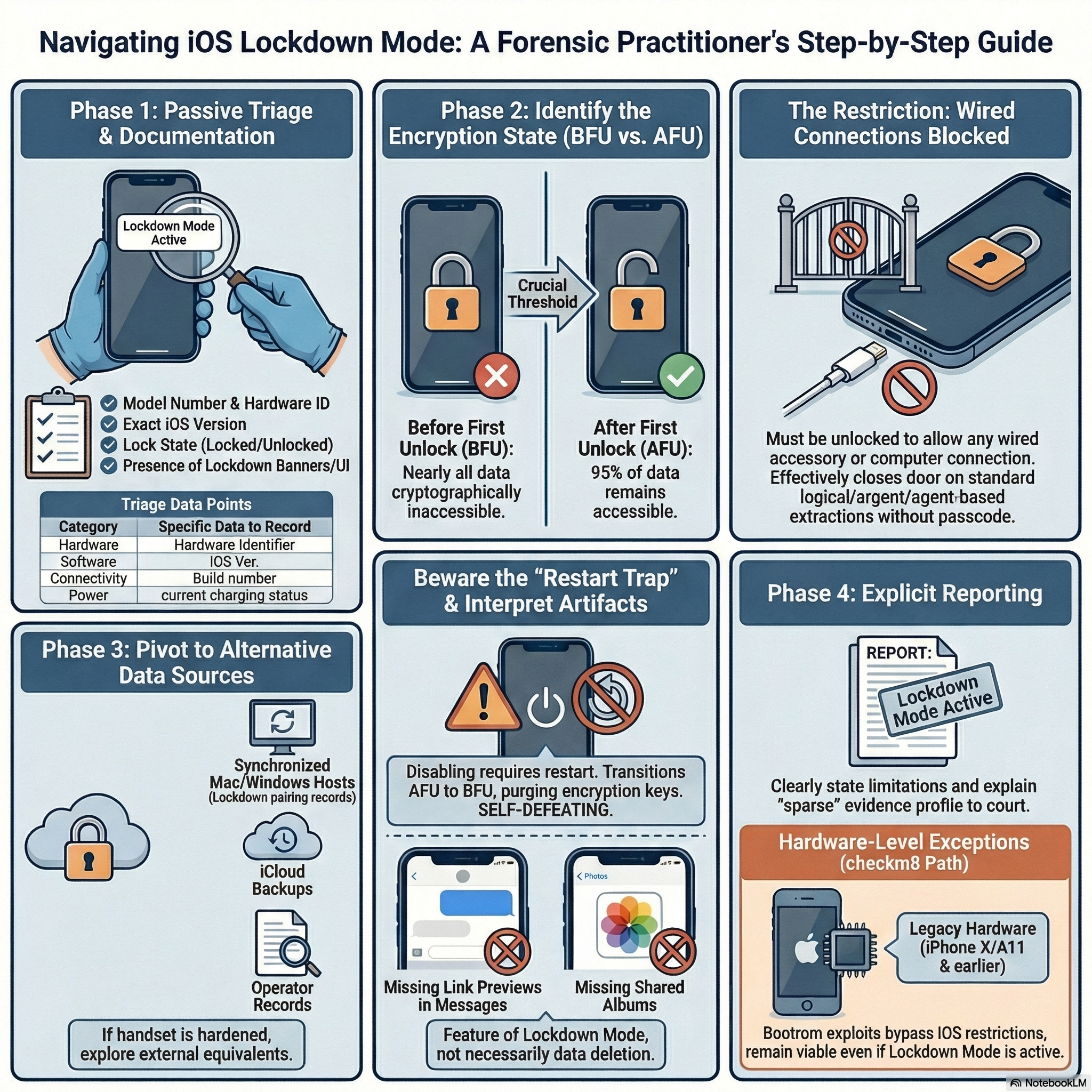
Executive summary: Lockdown Mode significantly narrows the acquisition paths available to examiners by restricting wired connections, new configuration profiles, and several user-facing features that create forensic artifacts. Forensic practitioners should treat a device in Lockdown Mode as having a different evidence profile, document its state at triage, and prioritize non-destructive options and alternative data sources.
The official description is deliberately minimal: an extreme protection that limits app behavior, web technologies, device management options, and hardware interfaces. What Apple describes as a privacy feature is, from a forensic standpoint, a systematic reduction of the channels through which investigators can reach and extract data from the device.
Understanding the concrete implications requires first understanding how iOS forensics works under normal conditions, and then mapping precisely which acquisition paths Lockdown Mode disrupts, which it does not affect in theory, and which remain conditionally available depending on device state and hardware generation.
iOS acquisition methods: a quick map
Before diving into Lockdown Mode’s effects, it is useful to recall the main acquisition techniques available for iOS devices, because the impact of Lockdown Mode differs substantially depending on the method.
The simplest approach is logical acquisition, which generates an iTunes-style backup of accessible user data, including app databases, contacts, calendar entries, messages, and notes. This method works without root access, is non-invasive, and leaves the device state unchanged. Encrypted backups are always preferable in this context because they yield substantially more data, including saved credentials, Health records, and Wi-Fi passwords. As I described in my post on modern iOS evidence acquisition without jailbreak, logical acquisition remains viable on iOS 18 and beyond, as long as the device is in a trustworthy state.
A step above logical acquisition is advanced logical (Logical+), which combines the standard iTunes backup with Apple File Conduit (AFC) access to /private/var/mobile/Media. This gives the examiner media files, downloads, books, voice recordings, and other content not captured in a standard backup, without requiring any exploit or elevated privilege.
More complete is agent-based extraction, in which a forensic-grade agent is deployed on the device via a trusted channel, allowing access to portions of the filesystem not exposed by AFC or standard backup mechanisms. This method depends on pairing trust and, in many implementations, on the device being in the AFU (After First Unlock) state.
At the deepest level, on hardware vulnerable to the checkm8 bootrom exploit, investigators can achieve a near-complete filesystem dump even from a locked device in BFU (Before First Unlock) state. This is the method I covered in detail in the post on BFU acquisition using checkra1n, and it remains relevant, but only for devices up to iPhone X with A11 and earlier chips, since checkm8 is a hardware-level vulnerability that Apple cannot patch via software updates.
Understanding the distinction between BFU and AFU is fundamental here. In BFU, the device has been powered on but the passcode has never been entered since boot: the file encryption keys are not loaded in memory, and nearly all user data is cryptographically inaccessible. In AFU, the passcode has been entered at least once, keys are in volatile memory, and the filesystem becomes largely accessible even through the locked screen. The difference in extractable data is enormous: AFU may yield around 95% of the filesystem, while BFU typically provides only metadata, system logs, and cached content with no access to encrypted user files. This BFU/AFU distinction, as Lucid Truth Technologies notes in their technical overview of lock states, is the real threshold for meaningful iOS evidence, and it is the axis around which Lockdown Mode’s forensic impact pivots.
What Lockdown Mode actually restricts
With that map in mind, it becomes possible to analyze what Lockdown Mode does at the level of acquisition paths.
The most consequential constraint for forensics is the restriction on wired connections: Apple’s documentation explicitly states that when Lockdown Mode is enabled, iPhone or iPad must be unlocked before it can be connected to an accessory or to another computer. In practice, this closes or severely limits the most common physical acquisition workflows when the device arrives at the lab in a locked state. Standard logical acquisition over USB depends on a trusted pairing record. Advanced logical acquisition via AFC has the same dependency. Agent-based collection requires an established trust channel. If the device is locked and Lockdown Mode is active, none of these can be initiated without user cooperation or a pre-existing pairing established before the mode was enabled.
A short technical clarification: Lockdown Mode is distinct from the older “USB Restricted Mode” (sometimes exposed as the “USB Accessories” timeout in Face ID & Passcode settings). USB Restricted Mode blocks accessory access when the device has not been unlocked for an extended period, while Lockdown Mode enforces a broader set of restrictions (including requiring unlock for wired connections regardless of previous pairing and blocking many web and messaging features). Both features affect wired workflows, and they can interact, but they are separate controls with different scopes and threat models.
The second technical restriction is the prohibition on new MDM enrollment and new configuration profile installation, as documented in Apple’s Lockdown Mode feature overview. This eliminates a class of management-assisted acquisition techniques available in enterprise or supervised device contexts. Even if the investigator has legal authority, installing a forensic profile or enrolling the device for supervised extraction is blocked unless Lockdown Mode is first disabled, which requires a restart.
Third, and equally important from an evidentiary perspective, Lockdown Mode suppresses several classes of user interaction: most message attachments other than select image, video, and audio formats; all link previews in Messages; incoming FaceTime calls from unknown contacts; Shared Albums in Photos; most complex JavaScript APIs in Safari/WebKit; 2G and 3G connectivity; and several Apple service invitations. The Apple Platform Security guide documents this in detail. For forensics, these are not just behavioral restrictions: they are artifact-shaping mechanisms. A device that has been in Lockdown Mode for weeks or months will have a different evidence profile from a device operating normally, independent of any extraction difficulty.
The pairing record problem
One of the most practically important topics in modern iOS forensics is the use of pairing records (historically called lockdown files) to establish trust with a locked device. As Forensic Focus documented in their detailed analysis of iOS lockdown pairing records, these files are created when the user taps “Trust” on a desktop pairing prompt, and they are stored on the host computer at well-defined paths: on Windows in %ProgramData%\Apple\Lockdown, on macOS in /private/var/db/lockdown. Elcomsoft iOS Forensic Toolkit supports using these records to authenticate and produce a backup without re-entering the passcode, provided the device is in AFU and was never allowed to reboot since the pairing was established.
With Lockdown Mode active, this workflow faces a compound obstacle. First, the wired connection itself requires the device to be unlocked. Second, even if a pairing record exists, the connection may be refused until the user authenticates. Third, enabling or disabling Lockdown Mode requires a device restart, which destroys the AFU state and transitions the device to BFU, removing access to the file encryption keys. In practice, this means that attempting to disable Lockdown Mode as a preliminary step to extraction is self-defeating: the restart that the mode change requires will cost exactly the AFU state that made extraction possible in the first place.
This is not a theoretical edge case. It is a common scenario when a device arrives at the lab locked but in AFU, and the examiner must decide whether to attempt extraction in the current state or first change device configuration. With Lockdown Mode active, the calculus changes: any configuration change triggers a restart, and that restart moves the device to BFU, where most forensic tools yield dramatically less data.
Commercial tools and their real-world limits
Cellebrite UFED and GrayKey are the most commonly cited commercial forensic tools for iOS, and both vendors advertise support for recent iOS versions. The honest picture, however, is more granular. Neither vendor publicly documents a confirmed bypass of Lockdown Mode on current hardware. Cellebrite’s product pages and technical notes discuss extraction capabilities in general (see their UFED product information: https://www.cellebrite.com/en/ufed/), but public documentation typically does not distinguish extraction results under Lockdown Mode from results without it.
The February 2026 case of Washington Post reporter Hannah Natanson provides the clearest real-world data point currently available: according to 404 Media’s reporting, the FBI’s Computer Analysis Response Team was unable to extract data from her seized iPhone because Lockdown Mode was enabled. The Freedom of the Press Foundation’s analysis of the same incident confirms that the standard forensic approach over USB was blocked by the feature. This is not proof that every iPhone in Lockdown Mode is permanently inaccessible, but it is significant evidence that standard workflows, including those used by well-resourced law-enforcement forensic labs, can fail.
Elcomsoft iOS Forensic Toolkit deserves a more nuanced treatment. Its product page documents support for advanced logical acquisition, agent-based extraction on select iOS versions, and bootloader-based extraction on supported hardware. The bootloader method (checkra1n/checkm8) is hardware-bound and in principle not affected by iOS-level restrictions like Lockdown Mode. But it only applies to devices up to A11, and those are increasingly rare in active investigations. For modern hardware, the tool’s capabilities still depend on trust, pairing conditions, and device state in the ways described above.
It is also worth noting that Elcomsoft’s documentation highlights a key asymmetry: a lockdown file can be used to establish trust without the passcode, but only when the device is in AFU and a valid, unexpired pairing record exists (see vendor documentation: https://www.elcomsoft.com/eift.html). Lockdown Mode does not eliminate this path in theory, but it adds the practical requirement that the device be unlocked for a wired connection to proceed, which often closes the path when the device arrives locked.
Artifact interpretation under Lockdown Mode
Beyond extraction strategy, Lockdown Mode creates a significant challenge for artifact interpretation that is easy to overlook. When an examiner encounters a sparser-than-expected evidence set on an iOS device, the default hypotheses are often deletion, anti-forensics, or factory reset. With a device that has been in Lockdown Mode, a third hypothesis must be added: the artifacts were simply never created, because the feature blocked the interactions that would have generated them.
Consider a few concrete examples. If the device has been in Lockdown Mode for months, there will be no link-preview artifacts in Messages, because link previews are disabled. There will be no Shared Album traces in Photos. Certain FaceTime metadata may be absent. Safari-side caches and storage for sites that rely on suppressed web APIs may be minimal or empty. In each case, the examiner who does not account for Lockdown Mode may draw incorrect conclusions about user behavior, data deletion, or timeline gaps.
This interpretive issue also affects court testimony. The BFU/AFU distinction already creates risk in testimony when reports omit the device’s encryption state: experts may assume AFU access while acquisition was BFU. Lockdown Mode introduces a similar risk—reports should state whether Lockdown Mode was present.
On iOS, the presence of Lockdown Mode is detectable at the system level and should be documented at triage time, along with lock state, software version, visible UI banners, and reboot history. As I noted in my earlier overview of iOS forensic acquisition methods, proper scene documentation is not a formality but a condition for defensible reporting.
Adapting the workflow
Given all of the above, the practical question is: what does a well-adapted forensic workflow look like when Lockdown Mode is present or suspected?
The first and most important step is passive documentation before any action. Record the device’s visible state; none of these observations require touching the device in a way that alters its state, and all of them affect subsequent decisions. A minimal triage checklist that should be captured (photo/screenshot and note) includes:
- Model and hardware identifier (to determine exploitability such as checkm8/checkra1n applicability)
- Exact iOS version and build
- Lock state (locked/unlocked) and whether AFU or BFU appears likely
- Presence of Lockdown Mode indicator or banner in Settings
- Reboot/uptime history if visible and recent prompts
- Presence of pairing prompts or known host pairing records
- Battery level and whether charging
HTML checklist snippet (copy into post as needed):
Triage checklist
- Model and hardware identifier
- Exact iOS version and build
- Lock state (locked/unlocked) and AFU/BFU assessment
- Presence of Lockdown Mode indicator/banner
- Reboot/uptime history and recent prompts
- Presence of pairing prompts or known host pairing records
- Battery level and charging status
The second step is evaluating whether extraction should be attempted over cable given the current conditions. If the device is locked and Lockdown Mode is active, a cable connection is likely to fail, and attempting it may consume battery, generate system logs, or cause the device to prompt for authentication in ways that complicate subsequent access attempts. This is a moment for strategic restraint rather than reflexive tool connection.
The third step is identifying alternative evidence sources. The iOS forensic ecosystem extends well beyond the handset itself. As I covered in my post on logical acquisition with libimobiledevice and on sysdiagnose extraction, a great deal of evidence persists in synchronized Mac or Windows hosts, iCloud backups, operator records, associated devices, and application-level cloud storage. When the handset is hardened, those adjacent sources often remain accessible and may contain equivalent or complementary evidence.
For devices in the legacy hardware range, specifically iPhone X and older, the checkm8 exploit path remains available and is not blocked by Lockdown Mode, because the exploit operates at the bootrom level before iOS loads. For modern devices, that path simply does not exist. This generational asymmetry is a significant practical factor, and it is one reason why triage documentation of the device model is so important: it determines whether low-level extraction is theoretically possible before any other decision is made.
Finally, reporting must be explicit. When Lockdown Mode is present, the report should say so plainly and explain its implications for both extraction capability and artifact completeness. A sparse evidence set on a Lockdown Mode device is a different finding from a sparse set on a device that was wiped. Courts, clients, and opposing experts deserve a clear account of what the feature does, why it limited access, and what alternative sources were or were not consulted as a result. Security features are not just obstacles to investigation: they are part of the digital record, and explaining them accurately is part of the analyst’s job.
Note on vendor documentation: some vendor links (for example Elcomsoft’s older PDFs) predate recent iOS versions; where possible, verify vendor capabilities against their latest technical notes or support channels. For readers who want low-level exploit details, see the checkm8 and checkra1n resources (https://github.com/axi0mX/checkm8, https://checkra.in/) as starting points.